
Voice note-taking tool
Capture every thought in an instant
A few taps is all it takes to start recording your thoughts, which are then organized in a knowledge base and made available to AI. It has never been this simple and effective.













The best way to take voice notes
Without Voicie
- Ideas vanish before you find the right app to write them down
- Recordings on a standard voice recorder have no transcription or structure
- You have to copy and paste context into AI chatbots
- Notes scattered across multiple apps
With Voicie
- Instantly capture thoughts with your voice
- Automatic transcription and an organized knowledge base
- AI works on your context - no pasting needed
- Integration with external apps and automations
The foundation of voice notes
Voice notes power everything in Voicie - from a quick thought to entire meetings handed off to AI chat.
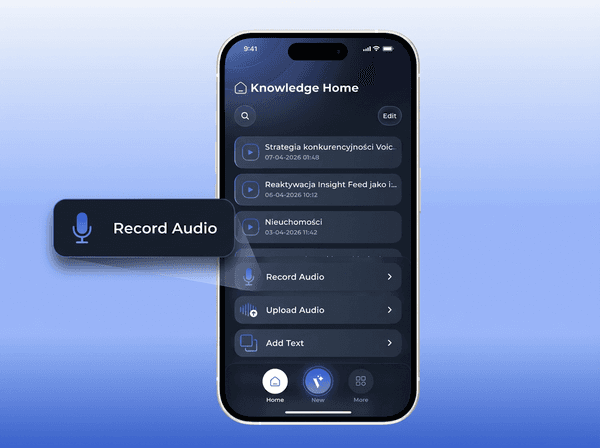
Record notes with a single tap
One tap starts recording, and then AI takes care of everything - from naming it, through transcription, to summarizing it with an assistant.
Every word, transcribed in seconds
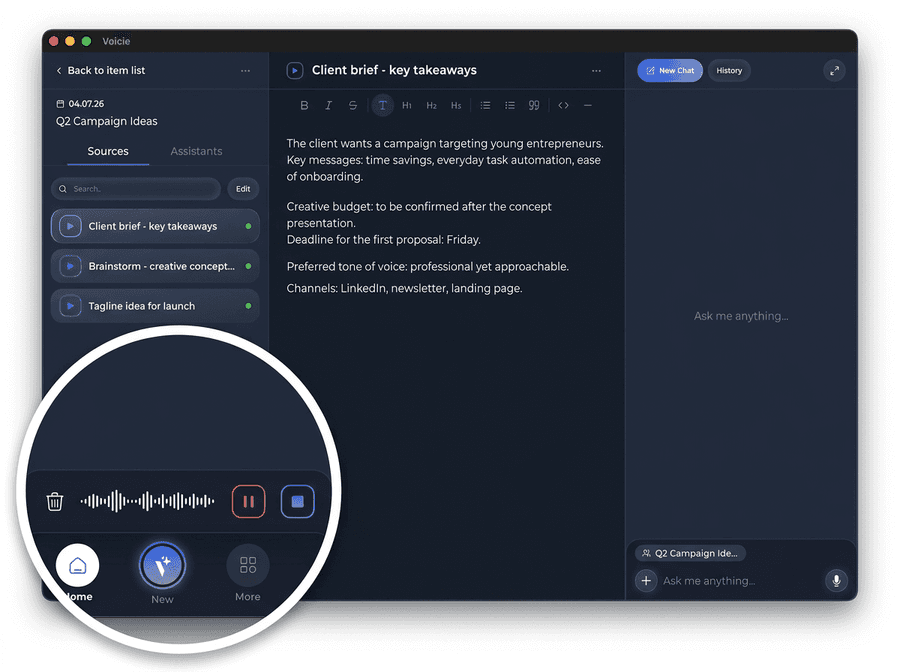
Recordings are transcribed automatically in the cloud. Precise, editable, searchable text - ready for AI. Accessible from any device - mobile, web, and desktop app.
A single note is just the beginning
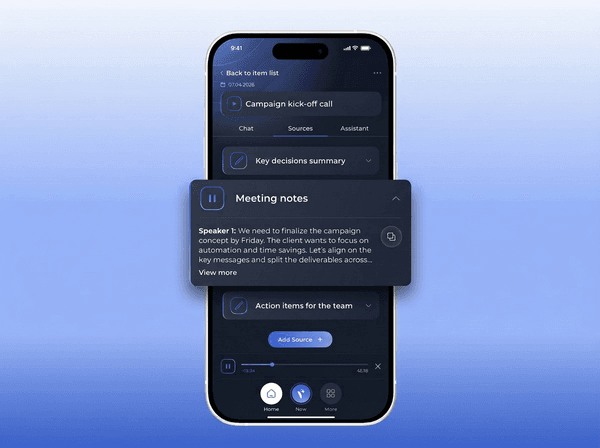
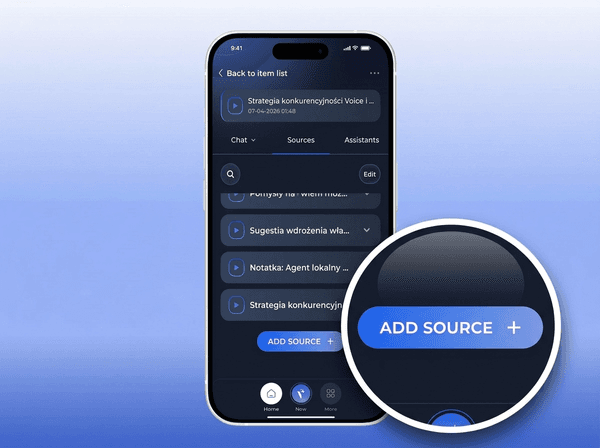
Voice notes go into Knowledge Items - themed folders that you build over time. Had a new idea on the same topic? Add another recording or attach text notes and data from other sources.
What makes Voicie stand out
For people who think faster than they type
Record offline, sync later
No signal? No problem. Record anywhere - on a plane, in a tunnel, at the edge of the world. Recordings save locally and transcribe automatically when you reconnect.
Build up context
Have a follow-up thought? Record it into the same Knowledge Item. Add new sources to an existing topic instead of creating scattered notes.
Record anywhere, access everywhere
Record on your phone during a walk. Review the transcription on your computer. Everything syncs across devices in real time.
Background recording
Start a recording and switch apps. Voicie records in the background on your phone. Take notes, check messages, or browse the web - recording keeps going.
AI-ready from the start
Every voice note is automatically available to the AI assistant and chatbot.
Zero unnecessary steps
No title. No folder to pick. Open the app, tap record, speak. The rest happens on its own.
Voice to action
Voice notes in Voicie are not the end - they are the starting point for automation. They turn spoken words into work performed by AI. Integrate Voicie with your apps.
Record
Capture a thought, meeting, or idea with one tap. On mobile or desktop.
Transcribe
Cloud transcription turns your voice into precise, searchable text in seconds.
Process with AI
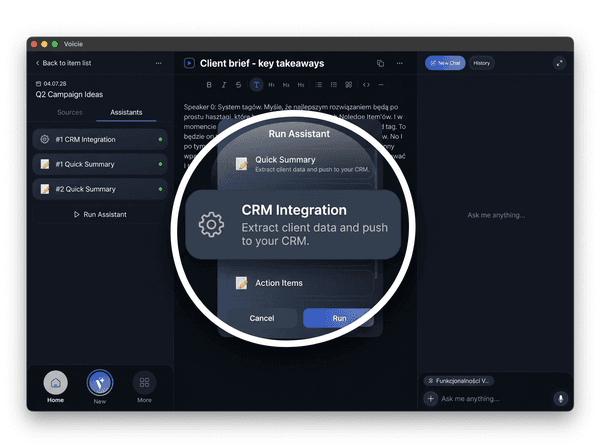
Run an assistant on your contextual folder (Knowledge Item). AI reads all sources and generates a summary or structured data.
Send via webhook
Assistant results are delivered via webhooks to your automated workflows integrated with your apps. The work gets done on its own.
Example use cases for voice notes
Voice notes in practice
From a call to a CRM update in one step
Record a client call, get it transcribed, and an AI assistant will summarize the key information and update your CRM for you.
Speak now, process later
On a walk, in the car, between meetings. Say what's on your mind - everything gets saved, transcribed, and ready for AI whenever you need it.

More about voice notes
Everything you need to harness the power of voice note-taking
High-quality audio
Recordings are saved in high quality for clear playback and accurate transcription.
Record directly in the app
Record directly in the app or upload existing files. Desktop supports MP3, WAV, MP4, and MOV.
Multi-language support
Record and transcribe in multiple languages. The system detects the language automatically.
Editable transcriptions
Fix a name, correct an industry term, adjust formatting. Transcriptions are fully editable after processing.
Source selection
Choose which sources the AI assistant should process. Deselect a recording to exclude it from analysis.
Chat with your note
Ask questions about the recording content in AI chat. Extract specific information without re-listening.
The Voicie Platform
Voice notes are just the beginning
See what else Voicie offers.
Frequently Asked Questions
A one-hour transcription is processed in one to two minutes. The time depends on recording length and current server load.
Yes. The mobile app supports offline recording. Audio is saved locally on your device and automatically transcribed when you reconnect. You never lose a recording because of poor signal.
Transcription happens automatically. From there, you can run an AI assistant on the note via chat or integrate the sources with external apps via a webhook.
No. A voice recorder creates isolated audio files. Voicie turns your voice into structured, searchable knowledge. Recordings go into Knowledge Items alongside other sources (text, soon PDFs and links), and AI assistants can process everything together. Results can be automatically sent to your CRM, project management tool, or Slack.
Yes. You can keep adding new recordings (and other sources) to the same Knowledge Item. This is one of Voicie's key features. Knowledge Items grow with new context. AI assistants always see the full picture.
Transcriptions are powered by OpenAI Whisper models (over 99 languages) and DeepGram Nova 3 (over 49 languages). Supported languages include English, Polish, German, Spanish, French, Portuguese, Italian, Dutch, Japanese, Korean, Chinese, Hindi, Arabic, Turkish, Ukrainian, Czech, Romanian, and many more.
