Voicie Mobile - The Best AI Voice Recorder - chat, offline mode & full feature set
Voicie on your phone is a voice note recording app with AI, available on iOS and Android. The new version introduces AI chat that works in the context of your knowledge base, plus an offline mode with automatic recording sync. Record, process, and automate - wherever you are.
What’s New
How Does AI Chat Work on Your Phone?
Chat in Voicie differs from ChatGPT in one way: it works in the context of your knowledge base.
Imagine you have a knowledge item called “Meeting with client ABC” containing a conversation recording, notes, and project documentation. You open the chat, pin that item, and ask:
“What were the client’s main needs? Create a priority list and suggest next steps.”
The AI has access to all sources within that item. You don’t need to copy or paste anything. The context is already there.
You can also ask more specific questions:
“Compare what the client said about the budget with the terms in our standard offer. Where are the differences?”
“Based on notes from the last three meetings — what topics come up most often? Create a priority list for next quarter.”
What you can do in chat:
- Ask questions in the context of pinned knowledge items
- Attach files — photos, PDFs, documents
- Enable web search
- Browse conversation history and return to previous threads
- Dictate messages by voice instead of typing
You build context in knowledge items, then interact with it. No copying, no pasting.
Offline Mode — Record Without Internet
You don’t always have a signal. In the car, on a construction site, in the mountains, at a meeting in an office basement — places without internet come up more often than you think.
Now that’s not a problem. Voicie lets you record even without an internet connection.
How it works:
- You record as usual — no difference in the interface
- Recordings are saved locally on your phone
- When you regain connection — automatic sync
- Recordings are transcribed and added to your knowledge items
Where this comes in handy:
Field sales rep — you drive between clients, recording a 2-minute summary after each meeting in the car. No need to hunt for a signal. You record, move on, and by evening at the hotel everything is already processed and ready to send to your CRM.
Construction site inspection — you walk around the site, dictating observations and concerns. Concrete, steel, and basements are natural enemies of signal. You record offline, and after stepping outside Voicie syncs everything and the AI assistant generates an inspection report.
Traveling without signal — on a plane, on a train through a tunnel, on a mountain trail. A good idea doesn’t wait for WiFi. You record it in Voicie and come back to it later, once the AI has processed it.
No lost thoughts, no lost recordings. You record when you need to — the internet catches up with you later.
All Mobile Features
Beyond the new additions, Voicie on your phone offers a full set of tools for managing knowledge with your voice.
Audio Recording and Transcription
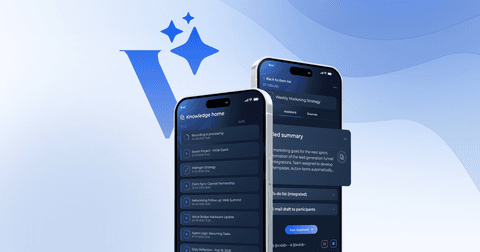
One tap — and you’re recording. Transcription happens automatically after you finish recording. The text is ready in a matter of seconds and immediately available as a source in your knowledge item.
You can record:
- Your thoughts and ideas on the go
- Sales calls and meetings
- Notes from podcasts and lectures
- Instructions and prompts for AI
Knowledge Base — Knowledge Items
Create knowledge items for every topic, project, or client. Each item is a thematic folder where you add various sources — recordings and texts.
You can have dozens of knowledge items — from “Content ideas” to “Client XYZ” to “Training notes.” Everything organized and ready to be processed by AI.
Sources — Source Items
You add sources to each knowledge item:
- Voice recordings — recorded directly in the app
- Texts — typed manually or generated
The more sources, the richer the context for AI assistants.
AI Assistants
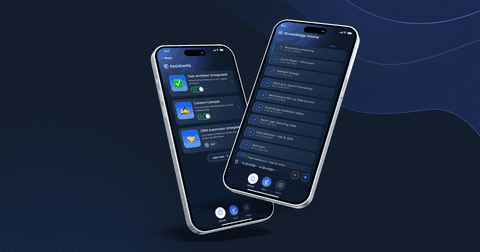
Create your own assistants with custom instructions. You define what the assistant should do — summarize, analyze, generate content, extract data — and run it on a selected knowledge item. Learn how in our step-by-step guide to building AI assistants.
The assistant processes all sources simultaneously and generates a result. For example:
- From a meeting recording, it creates a summary with a task list
- From loose notes, it generates a ready-to-post LinkedIn post
- From a sales conversation, it extracts data for CRM
Webhook Integrations
Assistant results can automatically flow to external tools. You connect a webhook — and data from Voicie flows to your CRM, ClickUp, Google Sheets, Slack, or any other system.
This means that with a single voice recording you can trigger an entire automation chain.
What You Can’t Do on Your Phone Yet
For full transparency — a few things that currently work only on desktop:
- Local transcription — processing audio directly on the device currently works only on Voicie Desktop for macOS. On your phone, transcription happens in the cloud.
- System audio recording — capturing audio from apps (e.g., Zoom, Google Meet) requires the desktop app.
These features may appear in future mobile versions, but for now — if you need these capabilities, Voicie Desktop for macOS is the ideal choice.
Who Is Voicie on Your Phone For
The mobile app is ideal when:
- You’re on the move and don’t have access to a computer
- You want to quickly capture a thought before it escapes
- You have conversations and meetings in the field
- You need instant access to your knowledge base
- You prefer dictating over typing
Voicie in Your Pocket
AI chat and offline mode are the two elements that were missing to make Voicie on your phone complete. Now you record wherever you are — even without internet. You build context. You talk to AI. You automate the flow of information. All from one app, in your pocket.
Find Voicie for iOS and Android on the App Store and Google Play.
Frequently Asked Questions
Does Voicie Work Without WiFi?
Yes. Voicie’s offline mode saves recordings locally on your phone. When you regain an internet connection, recordings are automatically synced and transcribed. No data is lost.
Is Voicie Available for iPhone and Android?
Yes. Voicie is available on both iOS (App Store) and Android (Google Play). Both versions include voice recording, knowledge base, AI assistants, AI chat, and webhook integrations.
Can I Record Meetings on My Phone with Voicie?
Yes. You can record meetings, calls, and conversations directly in the app. After recording, AI assistants can generate summaries, extract tasks, and send structured data to your CRM or project management tool via webhook.